-
[Proxy] Forward ProxyAzure 2025. 5. 16. 15:07
Forward Proxy
Forward Proxy(정방향 프록시)는 클라이언트(사용자)가 인터넷에 접속할 때 중간에서 요청을 대신 처리해주는 서버입니다.
즉, 사용자가 웹사이트에 직접 접속하지 않고, 프록시 서버를 통해 접속합니다.
Forward Proxy 작동 원리
Forward Proxy의 동작 방식은 다음과 같습니다:
- 클라이언트가 웹 요청을 프록시 서버로 보냅니다.
- 프록시 서버는 해당 요청을 실제 웹 서버에 전달합니다.
- 웹 서버는 응답을 프록시 서버로 보냅니다.
- 프록시 서버는 받은 응답을 클라이언트에게 전달합니다.
✅ 이 과정을 통해 클라이언트는 실제 웹 서버와 직접 통신하지 않고, 프록시 서버를 통해 간접적으로 통신합니다.
Forward Proxy 주요 목적
🔐 IP 숨기기 / 익명성 사용자 IP를 외부에 숨김 (웹 서버는 프록시 IP만 봄) 🔎 인터넷 접속 제어 관리자가 허용/차단할 도메인, 포트를 설정 가능 📚 사용자 트래픽 로깅 누가 어떤 사이트를 방문했는지 기록 🚀 속도 향상 (캐싱) 자주 요청되는 웹 페이지를 미리 저장하여 빠르게 응답 🌍 우회 접속 차단된 사이트에 우회해서 접근 가능 Forward Proxy 주요 특징
주로 누가 설정? 클라이언트 측 (회사, 학교, 사용자가 직접 설정) 트래픽 흐름 사용자 → 프록시 → 외부 서버 주 대상 외부 인터넷 보통 사용하는 경우 조직의 내부 사용자 관리, 웹 필터링, 캐시 제공 등 실습
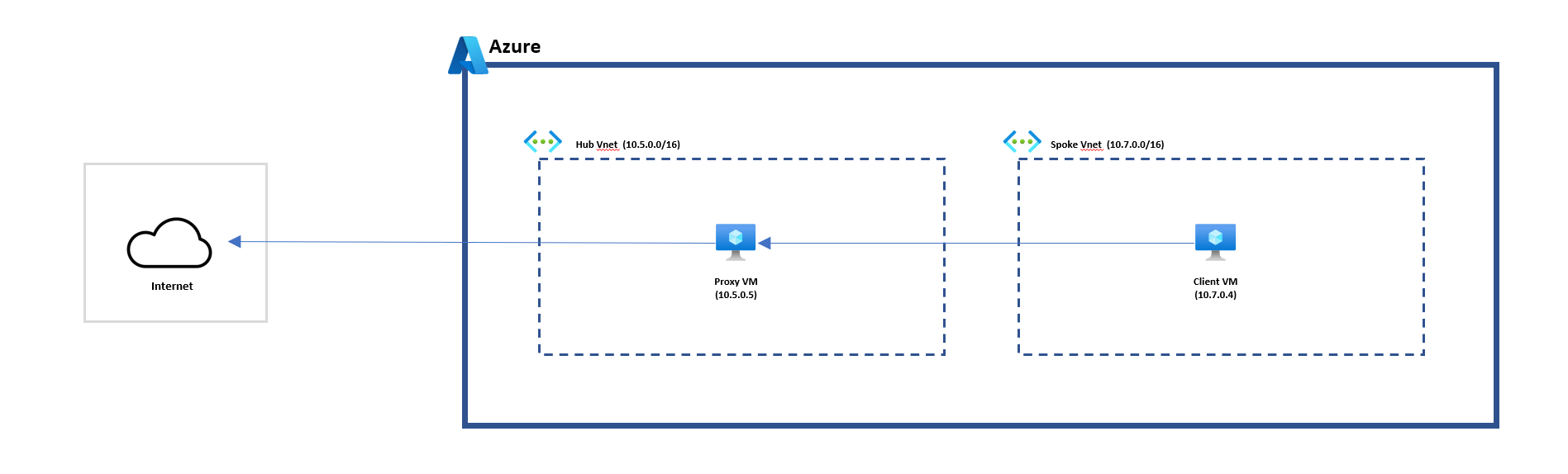
* 실습 환경
- Proxy VM (Ubuntu 24.04, squid proxy 사용, 10.5.0.5)
- Client VM (Windows 2022, 10.7.0.4)
Squid는 HTTP, HTTPS, FTP 등의 트래픽을 캐싱하고 프록시 역할을 수행하는 오픈소스 프록시 서버입니다.
주로 웹 가속, 콘텐츠 필터링, 네트워크 보안, 인터넷 사용 모니터링 등의 목적으로 사용됩니다.
Forward Proxy는 클라이언트 바로 뒤에 위치하여, 같은 내부망에 있는 클라이언트의 요청을 외부 인터넷으로 전달하는 역할을 합니다.
Proxy 서버 셋팅 (Ubuntu 24.04)
# squid 설치
apt install -y squid# /etc/squid/squind.conf 파일 수정
# squid.conf 예시

# 기본 Squid 설정
http_port 3128 # port 변경 가능, 기본 squid proxy 포트는 3128

# 로컬 네트워크 (client VM) 설정
acl localnet src 10.7.0.0/16

# 허용할 도메인 (www.naver.com)
acl allow_dst dstdomain .naver.com
acl allow_dst dstdomain .portal.azure.com

# Manage Azure VM
acl AzurePlatform dstdomain .monitor.azure.com
acl AzurePlatform dstdomain .vault.azure.net
acl AzurePlatform dstdomain .storage.azure.com
acl AzurePlatform dstdomain .storage.azure.net
acl AzurePlatform dstdomain .backup.windowsazure.com
acl AzurePlatform dstdomain .queue.core.windows.net

# Connect Entra ID & AD Server
acl EntraConnect dstdomain .mscrl.microsoft.com
acl EntraConnect dstdomain .verisign.com
acl EntraConnect dstdomain .entrust.net
acl EntraConnect dstdomain .management.core.windows.net
acl EntraConnect dstdomain .graph.windows.net
acl EntraConnect dstdomain .secure.aadcdn.microsoftonline-p.com
acl EntraConnect dstdomain .microsoftonline.com
acl EntraConnect dstdomain .management.azure.com
acl EntraConnect dstdomain .policykeyservice.dc.ad.msft.net
acl EntraConnect dstdomain .www.office.com
acl EntraConnect dstdomain .aadcdn.msftauth.net
acl EntraConnect dstdomain .aadcdn.msauth.net
acl EntraConnect dstdomain .www.google.com
acl EntraConnect dstdomain .crl3.digicert.com
acl EntraConnect dstdomain .crl4.digicert.com
acl EntraConnect dstdomain .digicert.cn
acl EntraConnect dstdomain .ocsp.digicert.com
acl EntraConnect dstdomain .www.d-trust.net
acl EntraConnect dstdomain .root-c3-ca2-2009.ocsp.d-trust.net
acl EntraConnect dstdomain .crl.microsoft.com
acl EntraConnect dstdomain .oneocsp.microsoft.com
acl EntraConnect dstdomain .ocsp.msocsp.com

# 안전한 포트들 설정 (HTTP, HTTPS)
acl Safe_ports port 80          # http
acl Safe_ports port 443         # https

# HTTPS 연결에 대한 설정 (SSL 포트)
acl SSL_ports port 443

# 비허용 포트들 차단
http_access deny !Safe_ports

# CONNECT 연결을 SSL 포트로만 허용
http_access deny CONNECT !SSL_ports

# localhost의 관리 요청만 허용
http_access allow localhost manager
http_access deny manager

# 허용 사이트만 허용하고 다른 사이트는 모두 차단
http_access allow localnet allow_dst
http_access allow localnet AzurePlatform
http_access allow localnet EntraConnect
http_access deny all

# 클라이언트가 다른 사이트로의 접근을 막는 규칙
http_access deny to_localhost
http_access deny to_linklocal

# 캐시 디렉터리 설정 (필요에 따라 수정)
cache_dir ufs /var/spool/squid 100 16 256

# Squid가 로그를 기록하는 경로
access_log /var/log/squid/access.log squid
테스트를 위해 azure portal 및 Entra ID 관련 일부 도메인을 허용 리스트에 추가하였다. (예외: 네이버ㅎ)
*참고 문서 : 방화벽 또는 프록시 서버에서 Azure Portal URL 허용
*참고 문서 : Microsoft Entra Connect 연결 문제 해결
# squid 재시작
systemctl restart squid# squid 상태 확인
systemctl status squid# NSG 설정

해당 실습에서는 방화벽 등 기타 장비 제어 없이 NSG를 통해 트래픽 제어를 진행하므로, 해당 규칙을 추가해준다.
- 인바운드 : port 3128 / source : Client VM 사설 IP / target : Proxy VM 사설 IP
- 아웃바운드 : port 80, 443 / source : Proxy VM 사설 IP / target : Internet
Client 서버 셋팅 (Windows 2022)
# Settings > Proxy 이동
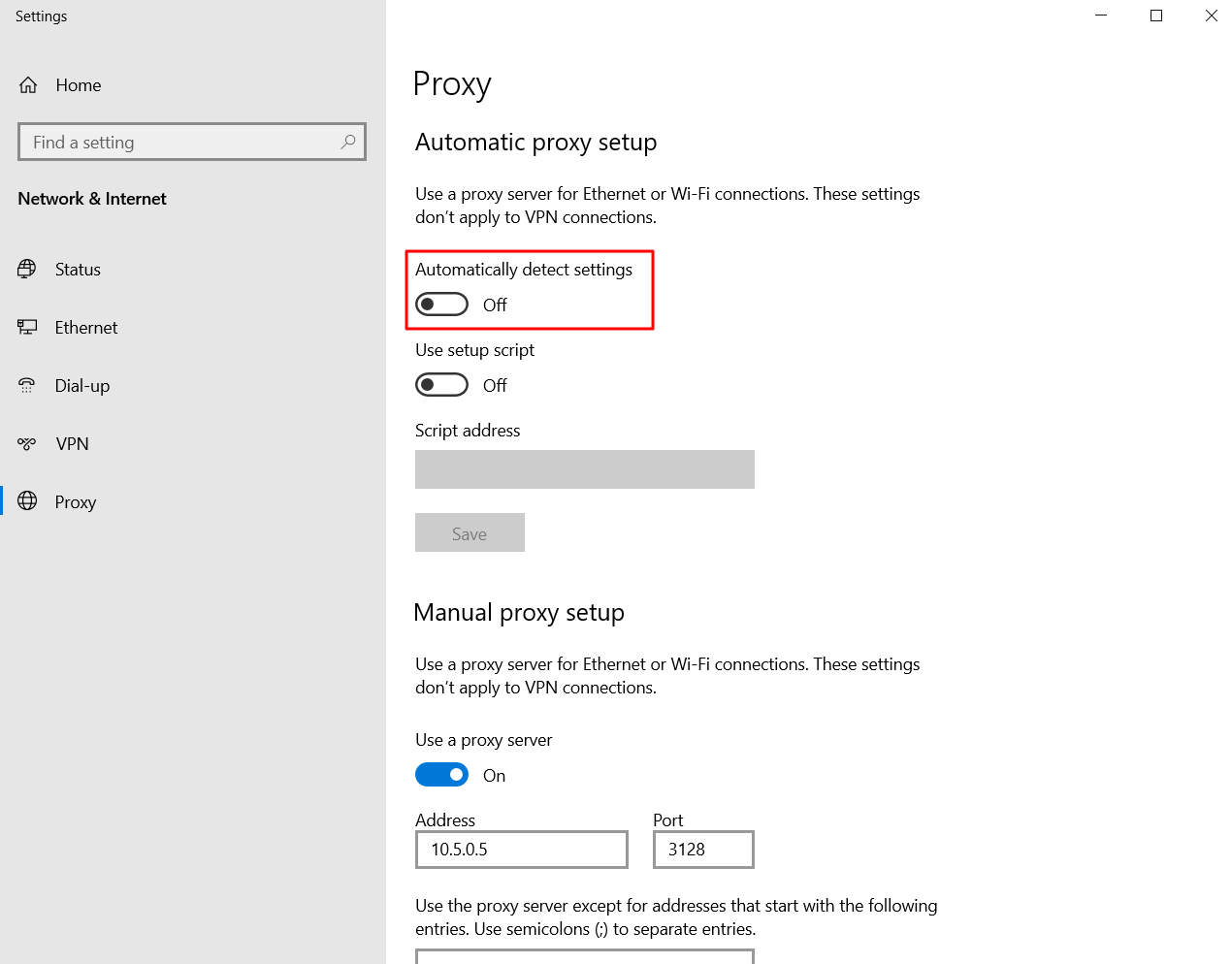
Automatically detect settings는 off
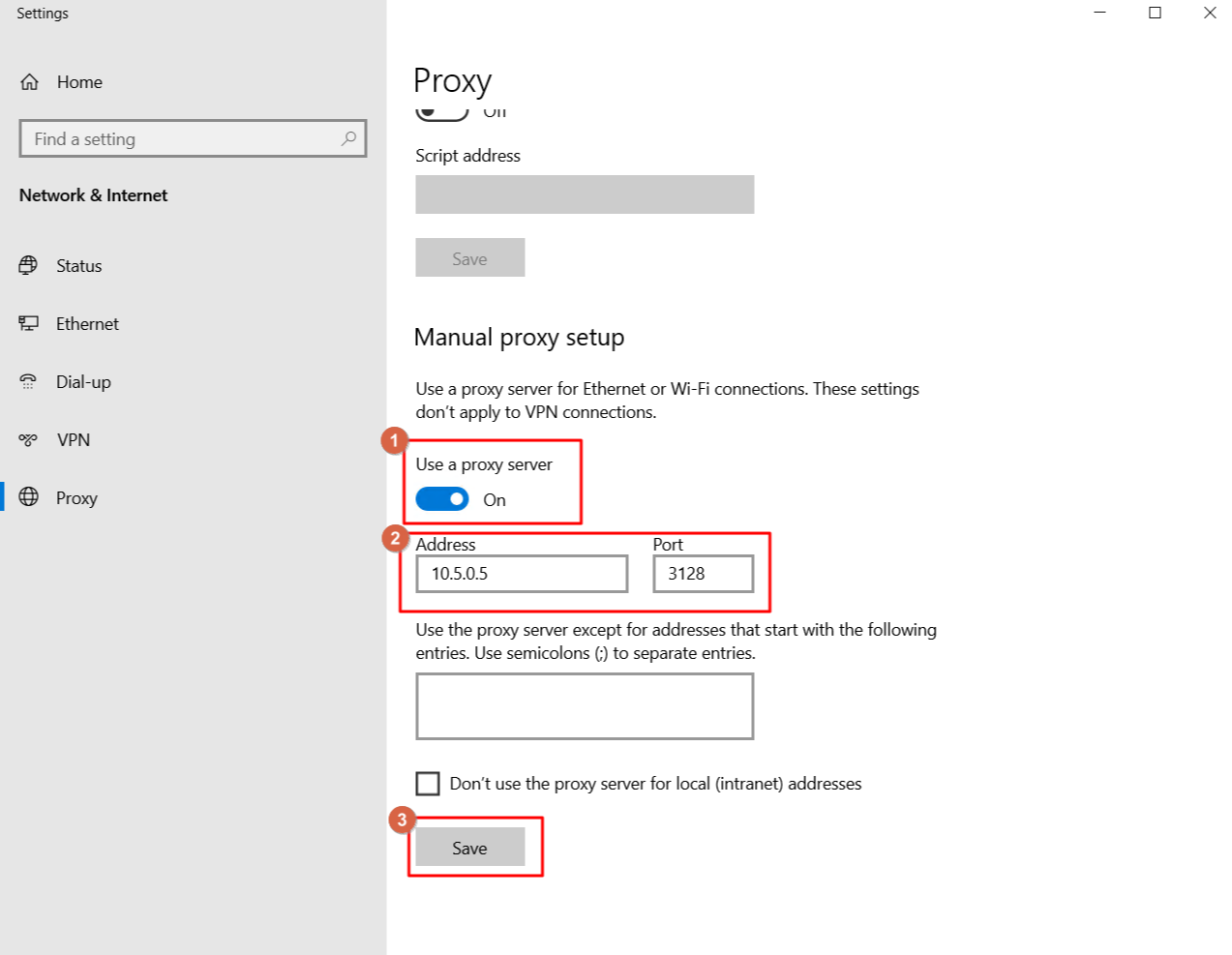
Manual Proxy Setup은 On
Proxy 서버의 사설 IP와 포트 3128 지정 후 Save
# NSG 설정
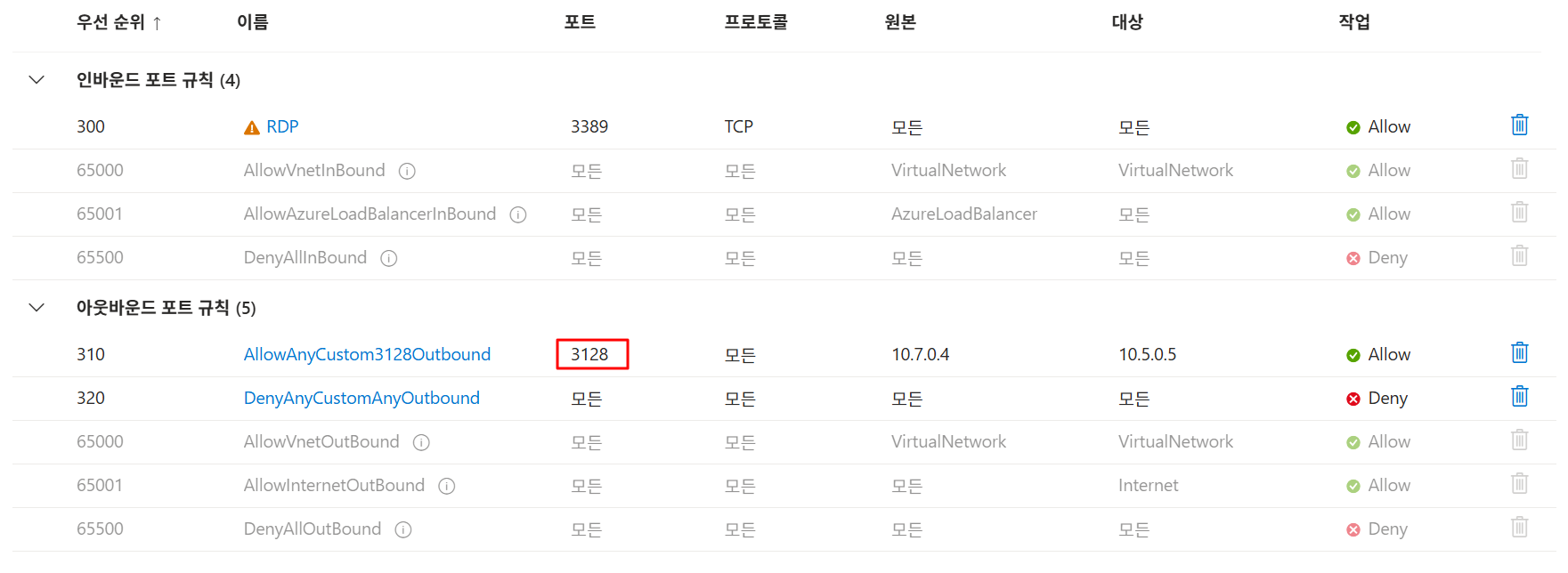
해당 규칙을 추가해준다.
- 아웃바운드 : port 3128 / source : Client VM 사설 IP / target : Proxy VM 사설 IP
테스트
# portal.azure.com 접속
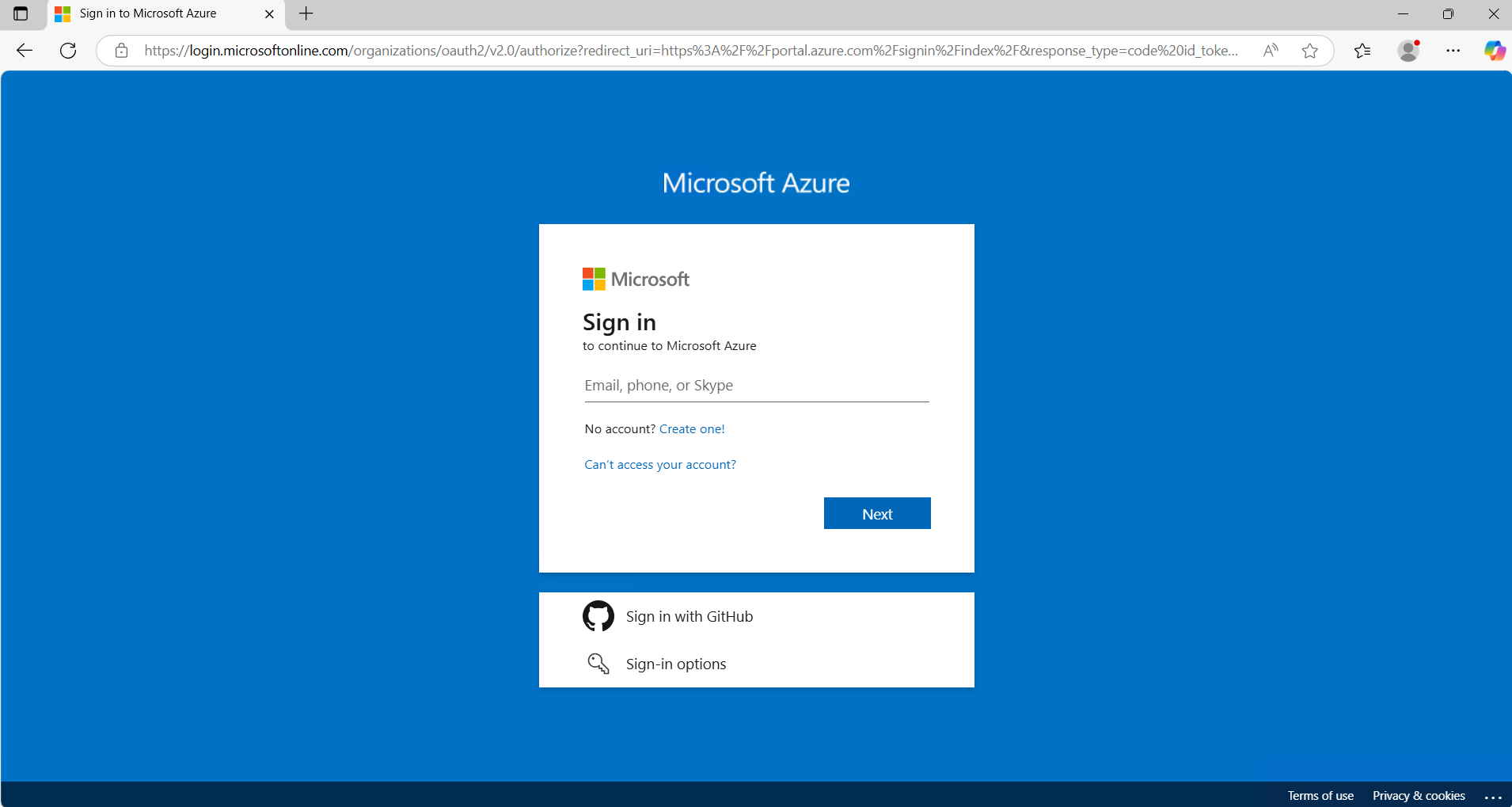
proxy 서버를 통해 정상적으로 접근 가능
# www.naver.com 접속

정상 접근 가능
# www.daum.net 접속

허용 도메인 목록에 없는 daum.net은 접근 불가
로그 확인
# tail -f /var/log/squid/access.log
tail -f /var/log/squid/access.log
---
1747378819.280   5009 10.7.0.4 TCP_TUNNEL/200 8132 CONNECT portal.azure.com:443 - HIER_DIRECT/150.171.84.30 -
1747378819.292   5001 10.7.0.4 TCP_TUNNEL/200 8132 CONNECT portal.azure.com:443 - HIER_DIRECT/150.171.84.30 -
1747378819.792   5115 10.7.0.4 TCP_TUNNEL/200 544 CONNECT aadcdn.msauth.net:443 - HIER_DIRECT/13.107.246.74 -
1747378819.813   5000 10.7.0.4 TCP_TUNNEL/200 544 CONNECT aadcdn.msauth.net:443 - HIER_DIRECT/13.107.246.74
리눅스에서 Squid 프록시 서버의 접근 로그(access log)를 실시간으로 모니터링할 때 사용됩니다.
- tail: 파일의 끝부분을 출력하는 명령어
- -f (follow): 파일이 업데이트될 때마다 새로운 내용을 계속 출력함
- /var/log/squid/access.log: Squid 프록시 서버의 접근 로그 파일 경로
[참고 문서]
https://greenwebpage.com/community/how-to-install-and-configure-squid-proxy-server-on-ubuntu-24-04/
'Azure' 카테고리의 다른 글
검색 증강 생성 및 인덱스 (0) 2025.11.04 Fortigate - Azure VPN 연동 (0) 2025.05.19 [Proxy] 프록시란? (0) 2025.05.16 [Windows] NTP 서버 생성 및 동기화 (Windows 2022) (0) 2025.05.13 [VM] cloud-init (0) 2025.05.12